


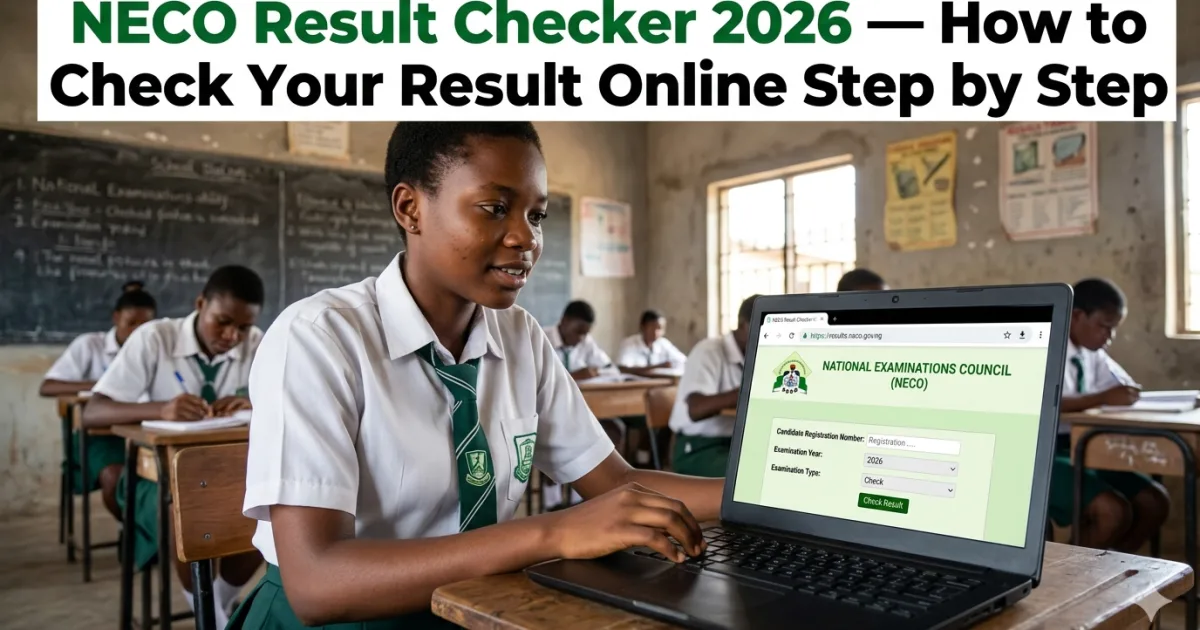
The National Examinations Council (NECO) conducts two major secondary school examinations every year in Nigeria — the SSCE Internal (for school candidates in June/July) and the SSCE External, commonly called GCE (for private candidates in November/December). In 2026, NECO has moved fully to a digital result-checking system using electronic tokens — the old scratch card method has been completely retired. Checking your NECO result in 2026 requires purchasing a digital token and using it on the official NECO results portal at results.neco.gov.ng.
This guide covers everything you need to know: how to buy the official NECO token, exactly how to use it to check your result, what the current token price is, how to troubleshoot every common error message, and what to do with your result once you have it. It also covers important new details for 2026 — including the fact that all NECO 2026 examinations are now fully computer-based, and explains what that means for candidates checking results.
NECO Token: What It Is and How Much It Costs in 2026
The NECO result-checking token is a unique 12-digit electronic PIN that serves as your authentication key to access the NECO results portal. It replaced the old physical scratch card system. Technext24’s April 2026 NECO result guide — published April 20, 2026 — confirmed the current token price: “Each token costs ₦2,100 as of April 2026 and can only be used once to check a single result.”
However, there is an important nuance confirmed by multiple sources including CutOffMark.ng and AJLS.ng: while the token is purchased once, it can be used up to 5 times for the same candidate’s registration number. This means you can share your token with parents, guardians, your school, or any institution that needs to verify your result — up to five separate uses. After the fifth use, the token is exhausted and cannot retrieve the result again.
| Token Detail | Information |
|---|---|
| Token price (2026) | ₦2,100 (Technext24 April 2026 confirmed) |
| Token format | 12-digit unique electronic PIN |
| Usage limit | Up to 5 times for the same registration number |
| Can be shared? | Yes — share with parents, guardian, school, or institution |
| Where to buy (official) | results.neco.gov.ng → “Purchase Token” |
| Token delivery | Instant — appears in your account dashboard after payment |
| Payment methods | Debit card, bank transfer, online payment platforms |
How to Buy a NECO Token 2026 — Step by Step
The official and most reliable way to purchase your NECO token is directly through the NECO results portal. Here is the exact process confirmed by AJLS.ng (January 2026) and JAET.com.ng (January 2026):
- Open a browser on your phone, tablet, or computer
- Visit the official NECO results portal: results.neco.gov.ng (not result.neco.gov.ng — note the “s” in “results”)
- If you do not have an account: click “Register” and create an account with your name, email address, and a password
- If you already have an account from a previous year: click “Log In” and enter your email and password
- Once logged in, click “Purchase Token” from your dashboard menu
- Follow the payment prompts — select your payment method (debit card, bank transfer, or supported payment platform)
- Complete payment — the portal uses secured payment processing
- After successful payment, your token (12-digit PIN) will appear under the “My Tokens” section of your account dashboard immediately
- Copy and save your token safely — you can share it with up to 5 people who need to check your result
Important: AJLS.ng warns: “Ensure you buy the token from a trusted and approved source, as fake or already-used PINs will not work on the NECO portal.” Buy exclusively from results.neco.gov.ng — never from WhatsApp groups, Telegram channels, or unverified websites that claim to sell NECO tokens at “discounted” prices. Fake tokens are a common scam that costs students their money and delays result access.
How to Check NECO Result Online 2026 — Complete Step-by-Step Guide
Once you have your token, checking your result takes less than two minutes. Here is the complete process confirmed by Technext24 (April 2026), JAET.com.ng (January 2026), and AJLS.ng (January 2026):
📱 NECO Result Check — What You Need Before Starting:
- Your 12-digit NECO token PIN (purchased from results.neco.gov.ng)
- Your NECO examination number (your registration number — found on your NECO exam card, result slip, or the printout from your school’s registration)
- Your examination year (2026 for this year’s results)
- Your examination type (SSCE Internal for school candidates; SSCE External/GCE for private candidates)
- An internet-enabled device (phone, tablet, or computer)
Checking Your Result — Step by Step
- Visit results.neco.gov.ng in your browser
- Log in with your email and password (the account you created when purchasing your token)
- From your dashboard, click “Check Result”
- From the dropdown menu, select your Examination Year — choose 2026
- Select your Examination Type:
- SSCE Internal — if you sat the June/July 2026 examination as a school candidate
- SSCE External (GCE) — if you sat as a private candidate in November/December 2025 or will sit in November/December 2026
- BECE — Basic Education Certificate Examination (Junior WAEC equivalent)
- NCEE — National Common Entrance Examination
- Enter your NECO examination number (10-digit registration number)
- Enter your 12-digit token PIN in the token field
- Click “Check Result” and wait for the portal to load — do not click twice, as this uses one of your 5 allowed checks
- Your result will display on screen showing all your subject grades
- Click “Print” to save or print your result — save a digital copy (screenshot or PDF) for your records
What Does My NECO Result Show?
Your NECO result displays your performance in each subject you registered for. Here is what the grades mean in 2026:
| Grade | Score Range | Category | JAMB/University Recognition |
|---|---|---|---|
| A1 | 75 – 100% | Excellent | Credit — accepted for university admission |
| B2 | 70 – 74% | Very Good | Credit — accepted |
| B3 | 65 – 69% | Good | Credit — accepted |
| C4 | 60 – 64% | Credit | Credit — accepted (minimum for most requirements) |
| C5 | 55 – 59% | Credit | Credit — accepted |
| C6 | 50 – 54% | Credit | Credit — accepted (lowest credit grade) |
| D7 | 45 – 49% | Pass | Pass — NOT accepted as credit for admission |
| E8 | 40 – 44% | Pass | Pass — NOT accepted as credit |
| F9 | 0 – 39% | Fail | Fail — not acceptable for any purpose |
What counts as a “credit” for university admission: Nigerian universities require a minimum of five credits (grades A1 through C6) in relevant subjects, including English Language and Mathematics (for most courses). Grades D7, E8, and F9 do not count as credits and cannot be used to meet admission requirements — even though D7 and E8 are technically “passes.”
Troubleshooting: Common NECO Portal Errors and Solutions
The NECO results portal can be slow or return error messages, particularly in the days immediately after results are released when traffic is very high. Here is a guide to every common error confirmed by Technext24’s April 2026 guide:
“Load Error” — Page Won’t Load
Technext24 confirms: “Load error usually happens when too many candidates are accessing the portal at the same time.” Solutions: Try switching to a different browser (Chrome → Firefox or vice versa). Clear your browser cache and cookies before retrying. Check at midnight or early morning (2am–6am) when portal traffic is lowest. If you have a slow internet connection, switch to a faster Wi-Fi or mobile data connection — the NECO portal requires a reasonably stable connection to load results.
“Result Not Found”
Technext24’s guide explains: “First, recheck your registration number and exam year for any typos. If the details are correct and the error persists, your result may not have been released yet for your exam type. Check back later.” NECO releases results in batches — if you sat a later examination date or are in a school that submitted data late, your result may appear several days after the initial release. Check every 24–48 hours if you receive this error with correct details.
“Result Withheld”
Technext24 confirms: “Result withheld means NECO has flagged your result for investigation. Log in to your account and raise a support ticket, or reach out to your school for guidance.” Withheld results typically arise from suspected examination malpractice (impersonation, leakage, or irregularity) detected during marking or post-examination review. Contact your school principal and the NECO state office for your examination centre to understand what the specific issue is and what steps to take.
“Invalid Token”
Technext24: “Double-check that you entered your token correctly. Head to the ‘My Tokens’ section of your account to confirm. If the problem continues, contact the vendor you purchased from or email support@neco.gov.ng.” Most “invalid token” errors are caused by simple data entry mistakes — a 0 (zero) instead of an O (letter O), or a 1 (one) instead of an l (lowercase L). Copy-paste the token from your dashboard rather than typing it manually.
Token Exhausted (Used More Than 5 Times)
Each NECO token can be used a maximum of 5 times for one candidate’s registration number. CutOffMark.ng confirms: “Yes, you can reuse it up to 5 times for the same candidate.” After 5 uses, you must purchase a new token to check the same result again. If you need your result checked more than 5 times (for multiple institutions requiring verification), purchase an additional token.
Important 2026 Update: All NECO Exams Are Now Fully Computer-Based
A significant change for 2026: Technext24’s April 2026 report confirmed that “the federal government has directed that all 2026 NECO examinations be fully computer-based.” This means the June/July 2026 SSCE Internal and subsequent examinations are conducted entirely on computers at CBT centres — there are no longer paper-based NECO examinations at the national level.
What this means for candidates and results: computer-based marking is significantly faster than manual marking of paper scripts. NECO has indicated that the shift to full CBT will enable faster result processing and release timelines — a change that, if implemented successfully, should reduce the historically long wait between examination completion and result release. It also means that any technical issues at CBT centres during the examination (power outage, server failure, system malfunction) become more critical to document and report immediately, as these can affect result accuracy in ways that are different from paper-based examination issues.
NECO Result Verification for Institutions (NERVS)
Universities, polytechnics, colleges, and employers who need to verify a candidate’s NECO result (rather than just view it) use a separate system: the NECO e-Verify platform at everify.neco.gov.ng. This is distinct from the results.neco.gov.ng portal that candidates use.
Institutions that need to verify NECO results can either: (1) integrate with NECO’s API for automated verification of results in bulk — relevant for universities processing thousands of admission applications; or (2) use the web portal at everify.neco.gov.ng to verify individual candidates by entering their registration number and checking against the database. The e-Verify system supports both local (naira) and international (USD) payment for verification services.
For individual candidates who need to provide verified results to institutions that have not yet integrated NECO’s API: obtain a verification token from results.neco.gov.ng and provide it to the institution as instructed by their admissions office. The institution uses your token through the NERVS (NECO e-Result Verification System) to confirm your result. This is the standard process for NYSC mobilisation, university admission, and employment purposes.
NECO vs WAEC: Key Differences for Nigerian Students
Both NECO and WAEC are accepted for university admission in Nigeria. Understanding the key differences helps students and parents make informed decisions about which examination to prioritise:
| Factor | NECO | WAEC |
|---|---|---|
| Conducting body | National Examinations Council (NECO) — Nigerian federal agency | West African Examinations Council — pan-West African body |
| School exam (June/July) | SSCE Internal (June/July) | WASSCE (May/June) |
| Private exam (Nov/Dec) | SSCE External / GCE (Nov/Dec) | WASSCE for Private Candidates / GCE (Nov/Dec) |
| Acceptance by universities | ✅ Accepted by all Nigerian universities — equal standing with WAEC | ✅ Accepted by all Nigerian universities and also internationally recognised |
| International recognition | Primarily Nigerian; limited recognition outside Nigeria | Recognised across West Africa and internationally (UK, Canada, Caribbean) |
| Result checking | results.neco.gov.ng — token ₦2,100 | waeconline.org.ng — token ₦2,000+ (similar price) |
| 2026 exam format | Fully CBT (computer-based test) | Combination of paper-based and CBT by subject |
| JAMB recognition | ✅ JAMB accepts NECO results for UTME qualification | ✅ JAMB accepts WAEC results |
Bottom line: For Nigerian university admission purposes, NECO and WAEC are completely interchangeable — Nigerian universities (and JAMB) accept both equally. If you are planning to study or work abroad in the future, WAEC has broader international recognition. For purely domestic purposes (Nigerian university admission, NYSC, Nigerian employment), NECO is fully adequate and in many ways more convenient since the examinations are conducted entirely within Nigeria’s educational system.
What to Do After Getting Your NECO Result
If You Have Enough Credits for University Admission
If your NECO result gives you five or more credits (A1–C6) including English Language and Mathematics, you meet the O’Level requirement for Nigerian university admission. Your next steps are:
- Upload your result to your JAMB profile immediately: Log into the JAMB eFacility portal at efacility.jamb.gov.ng and upload your NECO result. If you registered JAMB with “Awaiting Results” status, this upload is mandatory before your admission can be fully processed through the CAPS system.
- Register for Post-UTME at your institution: Once your JAMB score is out (results released from April 18, 2026 in batches), and if your score meets your institution’s cut-off, register for the Post-UTME screening as soon as it is announced.
- Monitor JAMB CAPS: Check admission.jamb.gov.ng regularly for admission offers — respond promptly within the deadline.
- Keep copies of your result: Print multiple copies and save a digital PDF. Universities, NYSC, and employers may all need copies at different points.
If You Need to Improve Your NECO Result
If you did not score enough credits for your target course and institution, your options include:
- NECO GCE (November/December 2026): Register for the SSCE External examination to resit the subjects you need to improve. Registration typically opens in September–October. The fee is ₦27,000 (confirmed in our WAEC fee guide). Both NECO GCE and WAEC GCE results are accepted.
- WAEC GCE (November/December 2026): Alternatively register for WAEC’s private candidate examination — the results are equally accepted by all Nigerian universities and have broader international recognition.
- NECO and WAEC results can be combined: JAMB and Nigerian universities allow you to combine results from two different examination sittings. If you have English from one sitting and Mathematics from another (as long as both are credits), this is acceptable. This means even a partial set of good grades in your June/July result can be “completed” with additional credits in the November/December sitting.
NECO Result Fraud Warning — Protect Yourself
Every NECO result season sees an explosion of fraud attempts targeting candidates and their parents. AJLS.ng warns: “Ensure you buy the token from a trusted and approved source, as fake or already-used PINs will not work on the NECO portal.” Here are the specific scams to watch for and avoid:
Fake Token Sellers
Fraudsters create websites, WhatsApp groups, and social media pages claiming to sell NECO tokens at discounted prices (₦500, ₦700, ₦1,000 — below the official ₦2,100). These are either completely fake pins or already-used tokens that will return an “invalid token” error. Buy only from the official portal at results.neco.gov.ng. If the price seems too good to be true, it is a scam.
“Result Upgrade” Services
Just as with JAMB, fraudsters advertise services claiming they can upgrade, change, or improve your NECO grades for a fee. NECO results are processed by a secure, centralised system and cannot be changed by any third party. Anyone claiming otherwise is a criminal. Do not pay. Report such individuals to NECO at support@neco.gov.ng or to the EFCC.
Phishing Portals
Fake websites are created to mimic the NECO results portal, collecting your login details and payment without delivering any token. Always navigate directly to results.neco.gov.ng by typing the address — never click links sent via WhatsApp or SMS claiming to be from NECO. Verify the URL carefully before entering any personal or payment information.
NECO 2026 Key Dates
| Event | Date / Period |
|---|---|
| NECO 2026 school registration deadline (normal) | Monday, May 25, 2026 (neco.gov.ng confirmed) |
| NECO 2026 school registration deadline (late) | Friday, May 29, 2026 (neco.gov.ng confirmed) |
| NECO 2026 SSCE Internal examination period | June–August 2026 (subject to NECO timetable) |
| NECO 2026 results release | Within weeks of exam completion; check results.neco.gov.ng |
| NECO GCE 2026 (private candidates) | November–December 2026 |
| 2026 exam format | Fully CBT (computer-based test) for all candidates |
Frequently Asked Questions — NECO Result Checker 2026
How do I check my NECO result in 2026?
Visit results.neco.gov.ng, log in to your account (or register), click “Check Result,” select your exam year (2026) and exam type (SSCE Internal or External), enter your examination number and your 12-digit token, then click “Check Result.” Your result displays instantly if it has been released.
How much is a NECO token in 2026?
The official NECO result-checking token costs ₦2,100 as confirmed by Technext24 in April 2026. Purchase exclusively from the official portal at results.neco.gov.ng — avoid unofficial sellers claiming to offer tokens at lower prices.
How many times can I use one NECO token?
One NECO token can be used up to 5 times for the same candidate’s registration number. You can share your token with parents, your school, or any institution that needs to verify your result — each use counts toward the 5-use limit. After 5 uses, you need to purchase a new token.
My NECO result says “withheld” — what does that mean?
A withheld result means NECO has flagged your result for investigation — typically related to suspected examination malpractice at your examination centre. This does not necessarily mean you personally cheated — it could be a centre-wide issue. Log into your NECO account and raise a support ticket, and contact your school principal and the NECO state office for your examination centre to get specific guidance on resolving the issue.
Can I check my NECO result without a token?
No — a token is required to access any NECO result through the official portal. The token is the authentication mechanism for the system. Any website claiming to let you check NECO results without a token is either fraudulent or showing fabricated data. There is no legitimate free NECO result checking method in 2026.
Is NECO result accepted for JAMB and university admission?
Yes — NECO SSCE results (both Internal/June-July and External/GCE) are fully accepted by JAMB and all Nigerian universities for admission purposes on exactly the same basis as WAEC results. There is no hierarchy between NECO and WAEC for domestic Nigerian educational purposes.
📋 NECO Result Checker 2026 — Complete Quick Reference
- Result portal: results.neco.gov.ng
- Token price: ₦2,100 (Technext24 April 2026 confirmed)
- Token uses: Up to 5 times per registration number
- Buy token at: results.neco.gov.ng → “Purchase Token” — official only
- What you need: Token + 10-digit exam registration number + exam year + exam type
- 2026 format: All NECO exams now fully CBT — no paper scripts
- Error “result withheld”: Contact school + NECO state office immediately
- Fraud warning: Never buy tokens from WhatsApp or discounted websites
- NECO vs WAEC: Both fully accepted for Nigerian university admission
- Registration deadline 2026 (school): May 25 (normal) / May 29 (late)
Also read: How to Check JAMB Result 2026 | JAMB Cut-Off Marks 2026 | WAEC Registration Fee 2026
NECO Past Questions and How to Prepare for the Examinations
With the 2026 NECO SSCE Internal examination scheduled for June–August 2026 and now fully computer-based, preparation strategy has changed slightly from the traditional paper-based approach. Here is a current preparation guide for candidates writing NECO in 2026:
Obtain NECO Past Questions
NECO past questions remain the single most effective preparation tool — the examination structure, question styles, and topic emphasis tend to be highly consistent from year to year. Past questions are available from NECO bookshops at NIS offices in state capitals, from educational publishers (Tonad, Bounty, Exam Focus) at major bookshops, from online platforms including Myschool.ng, ExamSuccess.ng, and various mobile apps that compile NECO past questions with answers. Practice at least the past 5 years of past questions in each of your registered subjects.
Adapt to CBT Format
Since 2026 NECO is fully computer-based, candidates who are not accustomed to reading and answering questions on a screen may find the format unfamiliar. Practise with CBT simulation tools — many of the apps and websites that host NECO past questions now offer timed CBT simulations that replicate the examination environment. Get comfortable navigating between questions on screen, flagging questions for review, and managing your time without the physical ability to write on the question paper as reference markers. If you are not confident with computers or touchscreens, practise daily in the weeks before the examination.
Know Your Examination Centre
Your CBT centre is assigned by NECO during registration — confirm the exact address of your centre well before examination day. Visit the centre location physically if possible so you are not unfamiliar with the route or the building on the day itself. Arrive at least 30 minutes before your scheduled examination time — late arrivals may be refused entry at CBT centres, unlike traditional paper halls where a few minutes of lateness was sometimes accommodated.
How to Read and Share Your NECO Result Officially
Once you have checked and confirmed your NECO result, here is how to use it correctly for different purposes:
- For university admission (JAMB): Log into efacility.jamb.gov.ng and upload your NECO result to your JAMB profile. Select “NECO” as the examination type and enter your registration number and examination year. JAMB’s system retrieves your result directly from NECO’s database to verify the grades — it does not rely on a physical certificate at this stage.
- For Post-UTME: Most universities request your O’Level result during Post-UTME screening. Print a copy of your result from results.neco.gov.ng and bring it to screening with your NECO token available for the institution to conduct e-verification if required.
- For NYSC mobilisation: NYSC requires O’Level results during the mobilisation process. Your NECO result printed from the official portal is accepted, along with your NECO registration number for verification.
- For employment: Most Nigerian employers accept printed NECO results from the official portal as proof of qualification. Keep at least three printed copies. Your original NECO certificate (the printed, stamped document issued by NECO after the examination) is a separate document from the portal printout — collect it from your school or apply directly from NECO for the original certificate if not yet received.
The token you purchase gives you a portal printout of your result — this is widely accepted for most purposes. However, the original NECO certificate (with NECO’s embossed seal and stamp) is a separate, more official document. If you have not received your original certificate from your school (for internal candidates) or from NECO directly (for external/GCE candidates), follow up with your school’s examination officer or contact NECO at support@neco.gov.ng with your registration number to arrange collection or delivery.
NECO Contact Information 2026
For all official queries about your NECO result, certificate, re-checking, or examination issues, use the following verified NECO contact channels in 2026: Website: neco.gov.ng | Results portal: results.neco.gov.ng | Email: support@neco.gov.ng | Headquarters address: NECO Headquarters, Niger State, Minna. For state-specific queries, locate your nearest NECO state office through the state offices directory on neco.gov.ng. When emailing NECO, always include your full name, examination year, examination type, and registration number to receive a specific and useful response. Result re-checking (if you believe your scores were incorrectly recorded) must be applied for through your school (for internal candidates) or directly through the nearest NECO state office (for external/GCE candidates) within the specified re-checking window announced after each examination cycle. Re-checking fees apply and the decision of the re-checking committee is final.
For the fastest resolution to any NECO portal error, always have your registration number, examination year, examination type, and payment receipt ready before contacting support — this information allows the NECO team to locate and resolve your issue in a single interaction rather than multiple back-and-forth exchanges.



0 Comments
No comments yet. Be the first to share your thoughts!