




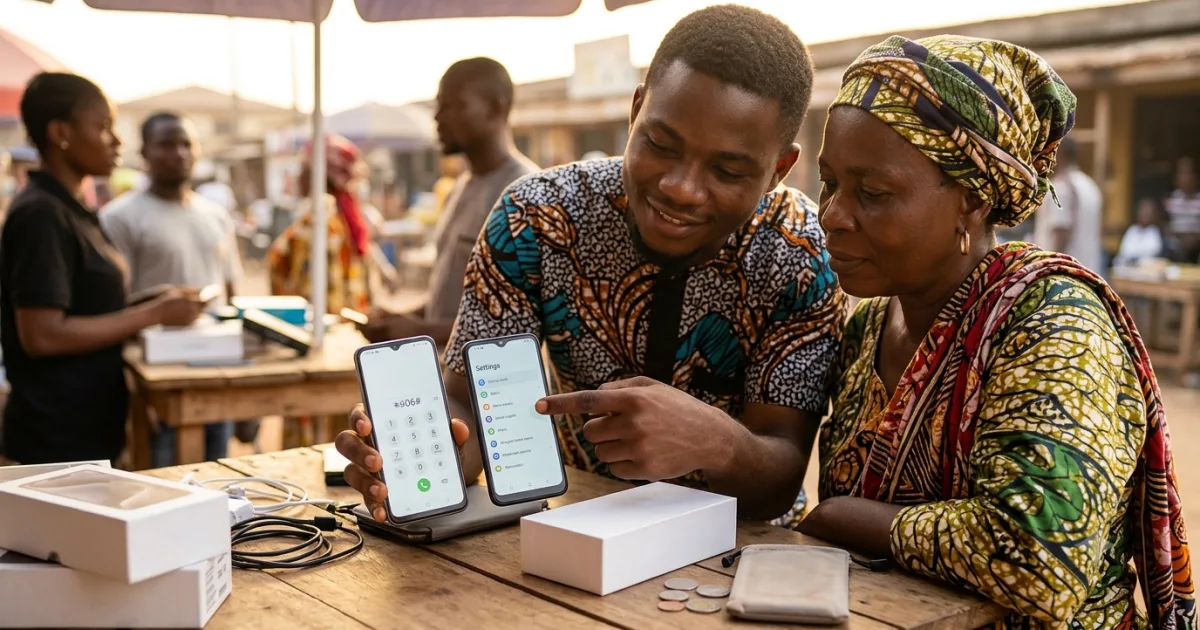
Nigeria’s phone market is huge, competitive — and full of clones. For every genuine Tecno, Samsung or iPhone on sale, there’s a convincing counterfeit or a “tokunbo” with hidden problems waiting for a buyer in a hurry. The fakes have got good: matching boxes, near-perfect bodies, even spoofed settings screens. Lose this game and you’ve paid real money for a phone that dies in months, can’t update, or was never what the seller claimed.
The good news: you don’t need to be a technician to protect yourself. A handful of quick checks — done before you hand over cash — will catch the overwhelming majority of fakes and clones. This guide walks through every one, from the 30-second IMEI test to the packaging tells and software checks specific to Tecno, Samsung and iPhone.
📌 The golden rule: never pay before you verify. Insist on opening, powering on and testing the phone yourself (or via pay-on-delivery inspection). A seller who rushes you, blocks inspection, or won’t let you run an IMEI check is telling you something — listen.
The 30-Second Test: Check the IMEI
The single most powerful check is the IMEI — the unique 15-digit identity number every genuine phone carries. Here’s the fast version:
- **Dial
*#06#** on the phone. The IMEI appears on screen. - Compare it to the IMEI printed on the box and, where applicable, under the battery or on the SIM tray. They must match exactly.
- Verify it online by entering the IMEI on a reputable IMEI-checking site. A genuine number returns the correct brand, model and specifications. A fake or recycled IMEI returns nothing, a mismatch, or a different phone entirely.
If the dialled IMEI, the box IMEI, and the online lookup don’t all agree, walk away. This one test alone catches a large share of clones, because counterfeiters often can’t produce a clean, verifiable IMEI that matches the model they’re claiming.
Check the Packaging — Carefully
Counterfeit boxes are better than they used to be, but tells remain. Look for spelling and grammar errors on the box or label (genuine brands rarely misspell their own features), blurry or off-colour printing, a barcode/serial sticker that doesn’t match the phone’s IMEI, and missing or flimsy accessories. A genuine retail box feels solid and consistent; a fake often feels slightly “off” — thinner card, smudged ink, a charger that looks generic.
That said, packaging alone never confirms authenticity — good fakes copy boxes well. Treat it as one signal among several, not proof.
Inspect the Body and Screen
Hold the phone and look closely. Build quality on genuine phones is even — tight seams, properly aligned buttons, no creaking. The screen should be crisp and responsive with accurate colours; clones often use cheaper panels that look slightly washed out or laggy to the touch. Check that branding and engravings are crisp, not faded or misaligned, and that ports and buttons sit flush. A back cover that flexes, a camera bump that wobbles, or a fingerprint sensor that’s painted-on rather than real are immediate red flags.
Run the Software Checks
This is where clones often fall apart, because faking hardware is easier than faking an operating system.
Verify the specs in Settings. Go to Settings → About phone and check the model number, processor, RAM and storage. Then compare these against the official specifications for that model (search the exact model number). Clones frequently claim “128GB / 8GB” on the box while About phone — or a benchmark app — reveals far less.
Install a hardware-info app (a reputable one) to read the actual chipset, RAM and storage, plus test sensors. A phone claiming a flagship chip that benchmarks like an entry-level one is a clone. Run a quick storage-capacity check too — fake storage is a classic counterfeit trick.
Check the OS itself. Genuine Android phones run real Android with the brand’s clean software; clones sometimes run a skinned, buggy build, fake app icons, or a “settings” screen that’s actually a static image. If the interface feels janky, apps crash, or the Play Store is missing or odd, be very suspicious.
Brand-Specific Tells
iPhone: verify the serial number on Apple’s official “Check Coverage” page — a genuine serial returns valid warranty/coverage info; a fake returns an error. Genuine iPhones run iOS (not a disguised Android skin), pair properly with the Apple ecosystem, and have a real, responsive interface. A “cheap new iPhone” deal is the most common phone scam in Nigeria — treat any too-good iPhone price as a clone until proven otherwise.
Samsung: dial #0# on a genuine Galaxy to open the built-in hardware-test menu (screen, sensors, camera) — clones usually can’t replicate it. Verify the model and serial via Samsung’s official channels, and check that One UI behaves like real One UI, not a generic Android theme.
Tecno / Infinix / itel: these are widely sold genuinely in Nigeria but are also widely cloned. Lean hard on the IMEI check and the About phone vs official-spec comparison, since the price point makes them a favourite counterfeit target.
Buying Tokunbo (Used)? Extra Checks
Used phones add a second risk on top of authenticity: condition and provenance. Beyond the checks above, confirm the phone isn’t blacklisted or locked (a stolen or carrier-locked phone may stop working or won’t accept your SIM), test the battery health (especially on iPhone, via Settings → Battery), check for iCloud/Google account locks — the phone must be fully signed out of the previous owner’s account, or you’ll be locked out — and inspect for water/repair damage. A clean, signed-out, IMEI-verified used phone from a trusted seller can be great value; a locked or blacklisted one is a paperweight.
Where and How to Buy Safely
Your buying channel is half the protection. Prefer platforms with buyer protection and pay-on-delivery inspection (you check the phone before releasing payment) over direct social-media sellers, where recourse is limited. For physical purchases, buy from established stores that give a receipt and warranty, not roadside sellers with no traceability. And whatever the channel: inspect, power on, run the IMEI and software checks, and only then pay.
FAQ: Spotting Fake Phones in Nigeria
1. What’s the fastest way to check if a phone is original?
Dial *#06# to get the IMEI, confirm it matches the box, and verify it on a reputable IMEI-checking site. If all three agree and return the correct model, that’s a strong sign of authenticity.
2. Can a fake phone have a working IMEI?
Counterfeiters sometimes clone or recycle IMEIs, so a number that “exists” isn’t enough — it must match the box and return the exact model you’re buying when checked online.
3. How do I know if an iPhone is fake?
Check the serial on Apple’s official Check Coverage page, confirm it runs real iOS (not a disguised Android), and be extremely cautious of any unusually cheap “new iPhone” — that’s the most common phone scam.
4. How can I tell a fake Samsung?
Dial #0# to open the genuine hardware-test menu (clones usually can’t replicate it), verify the model/serial via Samsung, and check that One UI behaves like the real software.
5. Are Tecno and Infinix phones often faked?
Yes — their popularity and price make them frequent clone targets. Rely on the IMEI check and compare About phone specs against the official model specifications.
**6. What does the About phone screen tell me?** It shows the claimed model, chipset, RAM and storage. Compare these to official specs and, ideally, a hardware-info/benchmark app — clones often claim more than the hardware delivers.
7. Is a cheap “tokunbo” iPhone safe to buy?
It can be, if it’s IMEI-verified, fully signed out of the previous owner’s iCloud, not blacklisted, and has healthy battery life. Buy from a trusted seller and check all of these first.
8. What’s an iCloud/Google account lock?
A security lock tying the phone to the previous owner’s account. If it isn’t removed before you buy, you can be permanently locked out — always confirm the phone is signed out.
9. Where is the safest place to buy a phone in Nigeria?
Platforms with buyer protection and pay-on-delivery inspection, or established physical stores that give receipts and warranties. Avoid prepaying unknown social-media sellers.
10. The seller won’t let me inspect before paying. What should I do?
Walk away. A legitimate seller allows inspection, an IMEI check and a power-on test. Refusal is the clearest red flag there is.
The Bottom Line
You don’t need special tools to avoid a fake — you need a routine. Run the IMEI check (#06#, match the box, verify online), inspect the packaging and body, compare About phone specs to official figures, run the brand-specific test (#0*# for Samsung, Apple’s coverage page for iPhone), and for used phones confirm it’s signed out and not blacklisted. Buy through a channel with inspection and buyer protection, and never, ever pay before you’ve checked.
Do that every time, and the counterfeiters lose. Your money buys the phone you actually paid for.
Related reading on NaijaSabi:
- Best Budget Phones Under ₦200,000 in Nigeria 2026 — what to buy once you can verify it
- Best Phones for Battery Life in Nigeria 2026 — the long-lasting picks
- How to Spot Online Scams in Nigeria 2026 — protect yourself everywhere online
Sources & References
- Apple — “Check Coverage” serial verification tool. Available at: checkcoverage.apple.com
- Samsung — device support and model verification. Available at: samsung.com
- Nigerian Communications Commission (NCC) — consumer guidance on device verification. Available at: ncc.gov.ng
Editorial standards. This article is independently researched consumer-protection guidance compiled from device-verification best practices and Nigerian market reporting. No single check is foolproof against sophisticated clones — combine several, buy through channels with inspection and buyer protection, and verify before paying. This is general advice, not a brand-authentication service. If you spot an error or have a correction, please write to editorial@naijasabi.com.ng.
Last reviewed and updated: 23 July 2026 · NaijaSabi Tech Desk.



0 Comments
No comments yet. Be the first to share your thoughts!