



📱 Quick Summary: The NCC USSD code to check approved phones in Nigeria is *315#. Dial it, choose option 1 (“Check this device”), and your phone’s approval status appears. You can also use the NCC Device Checker at ncc.gov.ng/devicechecker. Phones already connected to a Nigerian network before 7 October 2026 were automatically verified, so a warning SMS does not always mean your phone is fake.
The NCC USSD code to check approved phones in Nigeria is *315#, and thousands of people are dialling it after warning SMS messages started landing on iPhones, Tecno, Infinix and other handsets. The Nigerian Communications Commission (NCC) says phones that fail its type-approval checks could be disconnected after 30 cumulative days. Before you panic or rush to buy a new phone, here is how to check your status, what the warning really means, and what to do if your phone is flagged.
NCC Phone Approval 2026: Key Facts at a Glance
| Item | Detail |
|---|---|
| USSD code | *315# then option 1, “Check this device” |
| Online checker | www.ncc.gov.ng/devicechecker |
| Phone line | 315 (named in the warning SMS) |
| Verification took effect | 7 October 2026 |
| Warning SMS sender ID | NCC-Checker (per Technext) |
| Disconnection window | 30 cumulative days after a warning |
| Phones connected before 7 October | Automatically verified, per NCC |
| Your IMEI | Dial *#06# to see it |
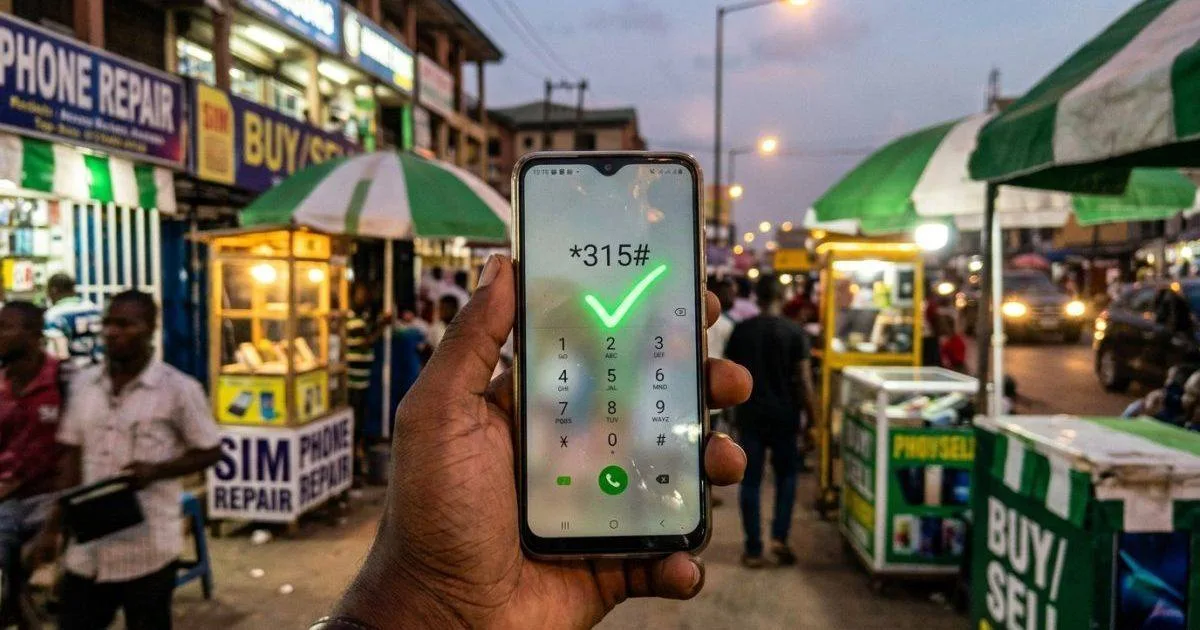
How to Check If Your Phone Is Approved with *315#
This works on any network. Follow these steps:
- Open your phone’s dialler.
- Dial *315# and press call.
- Select option 1, labelled “Check this device”.
- Read the result on screen. An approved phone shows a message saying it is NCC type-approved and verified for use on Nigerian mobile networks.
The USSD service also accepts a 15-digit IMEI number, so you can check a phone you plan to buy. Dial *#06# on any phone to see its IMEI. You can also find it in Settings or on the original box. Some reports say the service may not work smoothly for every subscriber during rollout, so an error message alone does not prove your phone is unapproved. Try again later or use the website.
How to Use the NCC Device Checker Website
If USSD fails, go to www.ncc.gov.ng/devicechecker on your browser. Enter the phone’s IMEI to see its type-approval status and network compatibility. The NCC also keeps a register of approved handsets. Search it with your phone’s exact model number, and try both the model code and the commercial name.
One important point: even if your model is on the approved list, your individual phone may still need verification in the Device Management System (DMS). The list tells you the model is approved. *315# tells you about the specific handset.
I Got an NCC Warning SMS: Is My Phone Fake?
Not necessarily. Users of iPhones, Tecno, Infinix, Oukitel and Google Pixel devices reported getting messages saying they have 30 cumulative days before disconnection, and to contact their seller or dial 315. Nigeria Startup News pointed out that the warning does not automatically mean a phone is fake.
The NCC says phones already connected to Nigerian networks before the system took effect on 7 October 2026 were automatically verified. If you still got a warning, dial *315#, screenshot the result, and keep the SMS. Then contact your seller or the NCC.
What Is the NCC Device Management System (DMS)?
The DMS is a central equipment identity register. It tracks devices by IMEI across all networks. It grew out of the NCC’s Type Approval Business Rules, introduced in 2024, and the NCC first proposed it in 2021. The stated aims include reducing phone theft, curbing counterfeit and cloned devices, and keeping substandard phones off Nigerian networks.
Innovation Village reports that the NCC has automatically captured and registered about 231 million devices already in use. The NCC is also working with the Nigeria Customs Service, manufacturers, importers and distributors to check devices as they enter the market. Importers and dealers carry most of the compliance burden, not everyday buyers.
What to Do If Your Phone Is Flagged as Unapproved
- Contact your seller first. The NCC message tells you to do this. A genuine seller should be able to confirm the phone’s IMEI was cleared.
- Call 315 for NCC guidance. One report listed a different number, so use the number in your own SMS or on ncc.gov.ng.
- Bought abroad or from a private seller? The NCC is preparing a registration process for people who legitimately acquired phones this way. Watch for its announcement.
- Do not pay random agents. Online posts claim fees of about ₦670 for standard phones and ₦3,700 or more for high-end phones. These amounts are unconfirmed. Confirm any fee with the NCC before paying anyone.
How to Check a Phone Before You Buy It in Nigeria
The NCC urges buyers of phones, tablets, modems and POS terminals to ask sellers whether the device is type-approved and to verify it independently. At the shop or the meet-up, take these steps:
- Dial *#06# on the phone and note the 15-digit IMEI.
- Dial *315# and enter that IMEI, or use the Device Checker website.
- Confirm that the result shows type-approved and verified.
- Do not pay until the check is clear.
This matters most for tokunbo phones, phones brought in by friends and phones bought on social media.
Is There a Traders’ Pushback?
Yes. Technext reports that the Association of Mobile Phones and Allied Products Traders of Nigeria rejected the compulsory device registration move in September. That is a trade association position, so expect more clarification from the NCC. Check ncc.gov.ng for updates.
FAQ: NCC USSD Code and Approved Phones
What is the NCC USSD code to check approved phones in Nigeria?
The code is *315#. Dial it and select option 1, “Check this device”, to see whether your phone is approved. It works for phones on all networks. If you want to check a phone you plan to buy, you can enter its 15-digit IMEI number.
How do I find my IMEI number?
Dial *#06# on your phone and the 15-digit IMEI will show on screen. You can also find it in the phone’s settings or printed on the original packaging. Dual-SIM phones usually have two IMEI numbers, so note down both before you check the device.
Will my phone be disconnected after 30 days?
Only if it is flagged as unverified and stays unresolved. The warning SMS says you have 30 cumulative days. The NCC says phones connected to Nigerian networks before 7 October 2026 were automatically verified. If you got a warning anyway, check *315# and contact your seller or the NCC.
Does the NCC warning mean my phone is fake?
No. Nigeria Startup News reported that the warning does not automatically mean a phone is fake. It means the device’s status needs confirming in the NCC system. Dial *315# to see your status, screenshot the result and keep the warning SMS, then contact the NCC if the result looks wrong.
Do I have to pay to verify my phone?
The NCC has not confirmed any consumer fee in the reports we reviewed. Social media claims of about ₦670 and ₦3,700 are unverified. Earlier DMS rules said a registration fee would apply to devices, but who pays and how much should be confirmed with the NCC before you part with money.
What if I bought my phone abroad?
The NCC says it is preparing a registration process for people who legitimately bought phones abroad or through private sales. The details were not yet published in the reports we reviewed. Check your phone with *315# now and watch ncc.gov.ng for the registration steps.
NCC rules are still rolling out. Confirm the latest on ncc.gov.ng or by calling 315.
Last updated: 15 October 2026 · NaijaSabi Tech Desk.




0 Comments
No comments yet. Be the first to share your thoughts!