




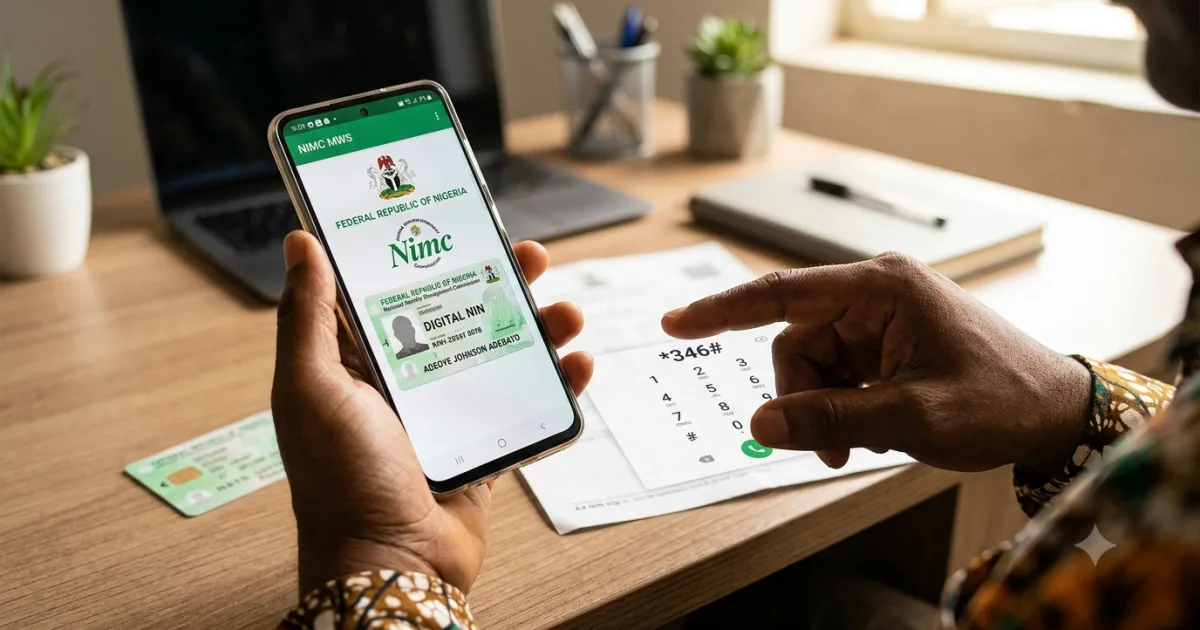
📌 Quick Summary: If you have forgotten or lost your NIN (National Identification Number), you can retrieve it in 4 ways without visiting an NIMC office: dial *346# on the phone line linked to your NIN (costs ₦20), send “NIN” to 346 via SMS (MTN, Airtel, Glo, 9mobile), check the NIMC MWS app on your smartphone, or log into your NIN self-service portal at nimc.gov.ng. If none of these work because your registered phone number has changed, you must visit your nearest NIMC enrolment centre with a valid ID. This is the complete 2026 guide — all 4 retrieval methods step by step, what to do when your registered phone number has changed, how to get your NIN slip reprint, and how to fix common NIN problems.
Your National Identification Number is 11 digits long and required for almost every important transaction in Nigeria in 2026 — opening a bank account, registering a SIM card, applying for a passport, registering to vote, applying for JAMB, collecting your PVC, applying for jobs, and accessing government services. Forgetting it is extremely common, particularly because it is not a number most Nigerians memorise. The good news: in most cases you can retrieve your NIN without leaving your house, without queuing at any office, and without paying more than ₦20. Here is exactly how.
Method 1: USSD Code — Dial *346# (Fastest Method)
This is the fastest and most accessible NIN retrieval method — it works on any phone, including basic feature phones, and takes less than 60 seconds.
Requirements
You must be using the phone number that was registered with NIMC when you enrolled for your NIN. If you have changed your number since enrollment, this method will not work — see the alternative methods below.
Steps
- Dial *346# from your NIN-registered phone number.
- A menu will appear. Select the option for NIN Retrieval — typically option 1 or labelled “Retrieve NIN.”
- Your NIN will be displayed on screen.
- Screenshot or write down the number immediately.
Cost: ₦20 — deducted from your airtime balance. This service is available on all four major networks: MTN, Airtel, Glo, and 9mobile. If you get an error message, verify that you are using the exact phone number you provided during your NIMC enrollment. If you enrolled multiple times or transferred your number to a new SIM, the number linked to your NIN may be your original enrollment number.
Method 2: SMS — Send “NIN” to 346
If the USSD code does not work for you, try the SMS method.
Steps
- Open your phone’s SMS app.
- Create a new message.
- Type NIN in the message body (just the three letters, nothing else).
- Send to 346.
- You will receive an SMS reply containing your NIN.
Cost: Standard SMS rate on your network — approximately ₦4–₦10 depending on your network. Works on MTN, Airtel, Glo, and 9mobile. Same requirement: the phone number you send from must be the number registered with NIMC.
Method 3: NIMC MWS App (For Smartphone Users)
The NIMC Mobile Web Service (MWS) app gives you access to your NIN and a digital version of your NIN slip directly on your smartphone.
Steps
- Download the NIMC MWS app from the Google Play Store (Android) or Apple App Store (iOS). Search for “NIMC MWS” — the official app by the National Identity Management Commission.
- Open the app and tap “Get NIN.”
- Enter your registered phone number and date of birth when prompted.
- An OTP (One-Time Password) will be sent to your registered phone number.
- Enter the OTP in the app.
- Your NIN and a digital NIN slip will be displayed.
The NIMC MWS app also gives you a digital NIN ID card — a virtual version of the physical NIN card — which is accepted by most institutions as valid proof of identity. Take a screenshot or save the digital card. This is increasingly accepted in place of the physical NIN slip for bank account openings, school registrations, and job applications.
Method 4: NIMC Self-Service Portal (Online)
For those who prefer a web browser over a phone app, the NIMC self-service portal provides NIN retrieval online.
Steps
- Go to nimc.gov.ng in your web browser.
- Click on “Self Service” or navigate to the NIN retrieval section.
- Enter your registered phone number and date of birth.
- Complete any OTP or verification step sent to your registered phone number.
- Your NIN will be displayed on screen.
This method requires a stable internet connection and works on both mobile and desktop browsers. The portal occasionally experiences downtime — if it is unavailable, try again later or use one of the other three methods.
What to Do If Your Registered Phone Number Has Changed
This is the most common complication with NIN retrieval. If the phone number you registered with NIMC when you enrolled is no longer active — because the number expired from inactivity, was reclaimed by your network, or you switched to a new number — none of the remote retrieval methods above will work. In this case, you must visit a NIMC enrolment centre in person.
What to Bring
| Document | Notes |
| Valid government-issued ID | International passport, voter’s card (PVC), driver’s licence, or birth certificate |
| Your current phone number | The number you want linked to your NIN going forward |
| Any old NIN slip if you have it | Not mandatory but speeds up the process if available |
What Happens at the Centre
The NIMC officer will verify your identity against the biometric data captured when you originally enrolled — your fingerprints and facial photograph are stored in the NIMC database. Once your identity is confirmed through biometric matching, they will provide your NIN and update your registered phone number. The visit typically takes 15 to 45 minutes depending on the queue at your centre. To find your nearest NIMC enrolment centre, visit nimc.gov.ng or use the centre locator in the NIMC MWS app.
How to Get Your NIN Slip Reprinted
The physical NIN slip — the laminated card showing your NIN, photograph, and biographic details — can be reprinted if lost or damaged. Reprinting is done at any NIMC enrolment centre. Bring a valid ID and your NIN number (retrieved using one of the methods above). There is a fee for reprint — confirm the current amount at your nearest NIMC office as fees are periodically updated. The reprint typically takes 1 to 3 weeks from application date for standard processing.
Linking Your NIN to Your Bank Account and SIM Cards
Once you have retrieved your NIN, link it to your bank accounts and SIM cards if you have not already done so — this is a CBN and NCC regulatory requirement in 2026. For bank accounts: visit any branch of your bank with your NIN and a valid ID, or use your bank’s mobile app to self-link if that option is available. For SIM cards: dial *346# from each SIM you want to link, select the SIM card NIN linkage option, and enter your NIN when prompted. NIN-unlinked SIM cards face periodic network suspension under NCC regulations.
Common NIN Problems and Solutions
| Problem | Solution |
| *346# shows “NIN not found” | You may be using the wrong phone number. Try the number you used at registration — not your current number if it has changed. If still not found, visit NIMC office with ID. |
| NIN not linked to bank account after providing it | Ensure you gave the exact 11-digit NIN with no spaces or extra characters. If the bank still cannot find it in the NIMC database, request a “NIN verification” at the branch — some records require NIMC database reconciliation. |
| Name on NIN does not match name on other documents | Apply for NIN modification at a NIMC enrolment centre. Bring the documents showing the correct name. Modification fees apply. |
| Duplicate NIN — enrolled twice | NIMC’s deduplication exercise will merge or flag duplicates. Visit a NIMC centre with both NIN numbers (if you have them) and a valid ID to have the issue resolved. |
| App downloads but shows error on verification | Ensure your phone date and time are set correctly (automatic/network time). Check your internet connection. If the problem persists, clear the app cache and retry. |
Frequently Asked Questions
How do I check my NIN on my phone?
Dial *346# from the phone number registered with NIMC and select the NIN retrieval option. Costs ₦20. Works on MTN, Airtel, Glo, and 9mobile. Alternatively, send “NIN” via SMS to 346 or download the NIMC MWS app.
Can I retrieve my NIN without going to NIMC office?
Yes — if your registered phone number is still active, you can retrieve your NIN remotely via *346# USSD, SMS to 346, the NIMC MWS app, or the NIMC self-service portal. You only need to visit a NIMC office if your registered phone number has changed and you cannot receive the verification OTP remotely.
How much does NIN retrieval cost?
₦20 via the *346# USSD code. Approximately ₦4–₦10 via SMS. Free via the NIMC MWS app and NIMC self-service portal (data charges apply).
What is the NIMC helpline number?
NIMC Contact Centre: 800-6462-6562 (toll-free) or 0800-NIMC-NIN. Available during business hours. You can also email info@nimc.gov.ng for non-urgent queries.
How do I know which phone number is registered with my NIN?
Try *346# on each phone number you have used in the past few years — starting with your oldest active number and working forward. Your NIN was linked to whichever number you provided when you enrolled at the NIMC office. If you enrolled before 2019, the number you used then may no longer be your primary number.
Can I change the phone number linked to my NIN?
Yes — visit any NIMC enrolment centre with your valid ID and your new phone number. The officer will verify your identity biometrically and update your registered number. Bring your NIN number if you have it, though it is not strictly required if biometric verification succeeds.
Sources
- NIMC Official Portal — nimc.gov.ng — NIN retrieval and self-service information
- NIMC MWS App — Available on Google Play Store and Apple App Store
Last updated: 5 September 2026 · NaijaSabi Civic Desk. NIMC procedures and fees are subject to change — verify current information at nimc.gov.ng before visiting an enrolment centre.
Why Your NIN Matters More Than Ever in 2026
The NIN has become the single most important identity document for Nigerians in 2026 — more immediately necessary than a passport for most daily transactions. The CBN’s financial inclusion drive has made NIN mandatory for all bank accounts, with accounts flagged for inactivity or restricted from receiving transfers when NIN linkage is not verified. The National Population Commission uses NIN for birth registration and vital records management. JAMB requires NIN for UTME registration and admission processing. INEC uses NIN as the foundation of the Continuous Voter Registration system. NIMC’s expanded mandate under the National Identity Management Commission Establishment Act means NIN is now required for SIM card registration, government service access, healthcare records, and pension administration under the contributory pension scheme. The NIN was introduced to Nigerians as a number they would one day need. That day has arrived. Every Nigerian 16 years and above who has not yet enrolled must do so at a NIMC enrolment centre — enrollment is free of charge. For those already enrolled, retrieving and securing your NIN is the most important identity management step you can take in 2026. Save it in your phone’s notes, photograph the NIN slip and store it in your cloud backup, and share it with your bank, your network providers, and any institution that requests it. Losing access to your NIN is an increasingly serious practical problem in Nigeria’s digitising economy — and one that is entirely preventable.
NIN for Children: What Parents Need to Know
Children under 16 are enrolled in the Junior NIN system — separate from the adult NIN but equally important. NIMC enrolls children from birth through the National Identity Management System’s integration with birth registration. Parents can enrol their children at any NIMC enrolment centre with the child’s birth certificate, the child’s photograph, and the parent or guardian’s own NIN. Junior NIN holders are automatically upgraded to full adult NIN when they turn 16 and present themselves at a NIMC centre for biometric capture. For parents of school-age children: several Nigerian universities now require applicants to provide both their own NIN and their parents’ NIN as part of JAMB and institutional registration. Enrolling children early avoids the last-minute scramble that happens when JAMB registration opens and NIN is suddenly urgently needed.





0 Comments
No comments yet. Be the first to share your thoughts!